Our school has Saturday School sessions. This year we have had 7 of them. They are organized to get back some of the average daily attendance funding that is lost when students are not in school. Students come to school for 4 hours and have a snack break of about 15 minutes.
In our school culture, Saturday School is usually considered a privilege or opportunity and an enriching experience rather than as a punishment. There is an attendance incentive for students wishing to attend dances. We have a program which identifies freshmen students who have not earned a passing number of credits; they are encouraged to attend to get tutoring and additional learning skills as well as get some make up work completed. During this time of year many Advanced Placement teachers run classes as an opportunity to take practice AP exams. Some teachers offer Saturday school as an opportunity to earn extra credit.
Since I teach a lab class, I can only take so many students (about 35 or 40) into my Saturday enrichment sessions. I can't over fill my class room because there is just not enough physical space or chairs. Students are scheduled into my sessions on a first come first served basis. My class usually fills up in less than 24 hours. I usually have a waiting list 10 or 15 students deep. You might ask why I have such a following for what would normally be considered something negative. I think it is a combination of the extra credit available, but also because of the cool labs and fun learning activities we can do in an extended period of time. You can do so many things when you have willing participants and extra time to gather, process and analyze the data.
I love teaching during our Saturday School sessions. I really like the time I get to do science activities that normally could not be done in a regular 55 minute class period. I normally plan a lab and some form of study game or practice and analysis for a test. I sometimes use Saturday School for a chance to work on a project we are doing in my class.
Last Saturday was our latest event and last session for the year before school is out. Since we have finals coming up, I thought I would give students the opportunity to review past tests and compare their performance to their study guides and to practice with a final from previous years. This is where things get pretty interesting, because the day could have been really boring- even if it was informative. There was not going to be a lab this time, so I took additional students including all who were on the waiting list, so I had 43 students in my room. I rearranged the desks for maximum spacing and borrowed chairs and a table from the room next door, so everyone would have a place to sit.
I broke the time into 4 activities. Students reviewed their old tests and study guides. The were not allowed to use their phones to photograph or copy the questions, but they could write notes to help them determine what they would have to study most for the final. I gave them about an hour for that process so they could review a couple of their tests.
Next, I had them write practice final questions on a shared google doc. I have a shared cart in my room with 20 chromebooks and a small set of 7 different chromebooks that I had purchased with grant money. In addition, I have 4 old desktop PC's that we use when we need solo tools. For this activity some students had to share devices, so it was rather noisy- especially when I told them they COULD NOT goof around on the document. Within minutes, someone started a comment bar on the side and the jokes WERE going around which I allowed as long as they were classroom appropriate. It was a bit of a chore to format the doc in a useful way, but they LOVED the idea that they could watch each other and their teacher working on a document at the same time. When someone discovered that there were too many people in the document they shouted it out and several left so that others could contribute.
Then I gave them the practice test from a previous year's class. They worked quietly for another hour or so on the practice final and later, I gave them a key when they were done so they could check their answers.
While they were taking the practice test, I was organizing their shared questions into a kahoot session. I uploaded their questions and answers with some editing- to be sure the answers were correct and the questions were understandable.
Once all students were done reviewing their tests and checking their answers, we played the Kahoot game. This is where things get fun. The question comes up on the projector screen and students use their phones, chromebooks, iPads or computers as their responders. It is very competitive. Students answer the questions as rapidly as they can and the system gives them 30 or 60 seconds to click in an answer. Once all students have answered, the game tells them how many points they earned, what place they are in on their device and on the projector who is in the top five. I cannot believe how loud it gets in the room when my students play this game. The students find it super exciting!
When the time came for students to leave at noon, we still had several questions to go and they did not want to leave. So we kept playing until the end of the game. I was just astounded. The class left about 10 minutes past the end time on a Saturday! They kept wanting to talk about what place they were in and how much fun they had been having. We had played jeopardy before and they were never this engaged. They love doing the labs, but this was really fun!
I will have to think about trying to incorporate this into a regular class session more often- maybe breaking it up into 2 days. The development of practice test questions is a critical thinking skill. They must decide what information is relevant. They need to figure out how to pose it in a question format with answers. The idea that they can teach each other something and then check for understanding for immediate feedback is really intriguing to them.
Next year as I plan new activities for Saturday School, I will have to keep this in mind, since it was such a successful and positive endeavor. I cannot wait!
Monday, May 4, 2015

Friday, March 21, 2014
Tales of A Conference Junkie
Hello.
My name is Kathy Diver.
I am an addict.
I am a Conference Junkie.
Wait....What? Am I addicted to conferences and workshops???
I have asked myself this question several times over the last few days. All these tweets about the CUE 2014 Conference in Palm Springs has me missing an event that I have attended several years in a row. I am watching my twitter friends and CUE RockStar colleagues enjoying their sessions, presenting to attendees and going to the keynotes and wondering why I decided to schedule my spring vacation in Colorado at the same time.
Don't get me wrong, I am having a great time on my vacation- hiking, bicycling, brew tasting, and spending a quiet week -just my husband and myself. But I have to admit, there is a big part of me that would rather be in a crowded conference room learning new tech things and listening to the keynotes by Lavar Burton and Sal Kahn.
OK- Now that the admission is out of the way, I suppose I should explain why I consider myself a conference addict.
I mentioned earlier that it takes time, energy and money to attend conferences. So here is what I do to pay for my conferences. First, I look for learning events that are FREE. Obviously, the free short term events are great because you only have to spend your time and energy to get there. Many of these are held on Saturdays or after school hours. These days, Twitter, EdCamps and PlayDates are important components of my "free" learning. I use these sources for learning about technology use for my classroom. And I rarely pass up an opportunity to learn some new things on my local scene. Years ago, my former districts offered tech classes and Spanish classes after school during the week. My current employer recently had a district wide collaboration which I attended on a Saturday.
It IS a sacrifice of time. You have to decide if your personal obligations can allow for some professional enhancement. When my own kids were younger, the Saturdays were filled with soccer games and Girl Scout activities. After school hours were spent helping with homework and creating dinners. Family time was not a good trade off for my professional learning. When they were young, I was able to attend more summer activities. I tried to squeeze in occasional after school or weekend events during the school year. The calendar was more difficult to manage at that time in my life. Now that they are both grown up, I have more time to commit to my professional development.
I also pay for some conferences and workshops. INVESTING in my own learning makes me take it more seriously. Over the last 15 years, I have attended several California Science Teacher Association and CUE conferences on my own dime. Mostly, I pay for the travel and living expenses, while my principals have often found funding for the registration or substitutes. They know I will bring back new skills and ideas to share among my colleagues. For them, it is a good investment of funds, because I am willing to share and teach others what I have learned.
There are a number of professional development opportunities for teachers to attend conferences that PAY a stipend to help compensate for expenses. Some are sponsored by a local school district or county office of Education. Others are paid through grant funding from agencies such as National Science Foundation or NOAA. Still others are available because of the philanthropic nature of the "for profit" companies such as Discovery Education and ETS. I have participated in a number of these institutes over the years. They are generally competitive and require an extensive application. A simple internet search for "paid summer teacher workshops" or "paid summer teacher internships" will turn up a huge variety of learning opportunities. The sooner you check it out, the more opportunities you will find since many of applications for the competitive summer institutes close in the spring.
In order to get the best "bang for my buck," I plan to attend almost every session available, so that means I arrive a half hour or more before the first session starts and leave room in my schedule to stay until after the last session closes. If there are sessions that have similar classes or offerings more than one time, I try to work out my schedule to its best advantage, so that I can get the most from my experience. I try not to take breaks during session times unless there is no session of interest for me.
I try to get to the session EARLY so that I can sit close to the front. I have learned that arriving early to a session is better especially as I am now at an age when I do not want to sit on the floor when there is no seating space left in the room. I like to interact a little bit with the presenter as they are preparing for their discussion. I have offered to help set up or even break down after a session. During the presentation, I like to ask questions that can help me in my practice. I try to get any paper resources if they are available for participants (an advantage for coming early). For my last several conferences, I have used my iPad or computer to take notes and pictures so I can review them later to help infuse ideas into my teaching. I always save internet resources directly into my computer for later perusal. Even now, I use internet resources that I bookmarked 5 or 6 years ago at a conference.
I always try to bring small snacks (apples, string cheese, crackers, carrots) and water or iced tea. That way, I don't have to wait in line to pay conference venue prices for snacks or drinks on the go. If I am going to a conference with another person I know, I try to spend "free" time with them, so we can discuss what we have learned during the sessions. I like lunch and scheduled breaks for this kind of networking. It's also ideal if you have to "commute" with someone to the convention location. You can use that commuter time for debriefing and learning what they found out in the sessions they have attended.
I also try to NETWORK with other conference participants. I have recently been active in the twitterverse and I now have many "cyberfriends" with whom I can share and discuss about the things I am learning. I love meeting up with these people face to face. Some of my twitter pals include some of the foremost people in their fields and seeing their presentations puts a new perspective on what is possible in my own teaching. These collective discussions create a bigger pool of learning where I can tap into and glean out precious nuggets for my own classroom. It is especially good for times like this week, when I am not on the conference site and I am still able to learn from the folks in my twitter feed to see if I can get any new resources for myself.
I like to DISCUSS my sessions with someone. My poor husband is sometimes my target, but I usually try to chat with others in my profession, so I can review and reflect on what I have learned. The day after my conference, I like to organize my notes and paper resources. At that time, I will review and rewrite all electronic notes I have taken during my sessions. I will reorganize the bookmarks I have made of any of the internet resources I have found. I look over my lesson plans for the next week, so that I can find some ways to incorporate at least 2 of the simpler things within the next few days. When there are more complicated and time consuming things, I tend to leave some of those for later use within the next month.
I try to INFUSE the most useful and interesting things as soon as I can. It keeps the ideas fresh in my mind. For example, I attended a screen casting session at CUE 2012. This was months before I had ever heard of "flipped instruction," but I could immediately see a use for recording my notes and lectures, so the following Tuesday, my students had to watch their very first screencast of class notes.
Yes, I am missing hanging out with my friends at CUE 2014 this week. I am sad that I am missing the Google Summit happening on the weekend. I know there will be other learning opportunities for me. In the meantime, I will feed my addiction to conference learning by having an informal 'appy hour or coffee cue with teachers in my school in the next week or so. I will be heading to San Francisco in April for the University of California Curriculum Integration Institute with my friend Mary Haus. I will be attending a district collaboration with the focus on NGSS for biology teachers early in June. I plan to attend the CUE Rock Star in Manhattan Beach with several colleagues late in July.
I have been thinking of using this topic as a conference presentation. I wonder if others feel the way I do about conferences and workshops. I have decided that being an addict of learning is really NOT a bad thing. If you are not a conference junkie yourself, maybe you should follow the process I have outlined above and infuse some excitement into your own practice. You won't believe how great it feels to be a lead learner among your students. They can sense your newfound energy and appreciation for learning and it will become an important model of what it is for all of us to be a life long learner.
My name is Kathy Diver.
I am an addict.
I am a Conference Junkie.
Wait....What? Am I addicted to conferences and workshops???
 |
| Missing CUE 2014 but I'm getting info from my Tweeps |
Don't get me wrong, I am having a great time on my vacation- hiking, bicycling, brew tasting, and spending a quiet week -just my husband and myself. But I have to admit, there is a big part of me that would rather be in a crowded conference room learning new tech things and listening to the keynotes by Lavar Burton and Sal Kahn.
OK- Now that the admission is out of the way, I suppose I should explain why I consider myself a conference addict.
Conferences and workshops take time, energy and money. The resources I gain from attending professional learning events also take a great deal of effort and planning to incorporate into my lessons and teaching. What do I do to make it work and to get the most out of my experience?
How do I afford it?
 |
| John Stevens presents at our district wide collaboration |
It IS a sacrifice of time. You have to decide if your personal obligations can allow for some professional enhancement. When my own kids were younger, the Saturdays were filled with soccer games and Girl Scout activities. After school hours were spent helping with homework and creating dinners. Family time was not a good trade off for my professional learning. When they were young, I was able to attend more summer activities. I tried to squeeze in occasional after school or weekend events during the school year. The calendar was more difficult to manage at that time in my life. Now that they are both grown up, I have more time to commit to my professional development.
I also pay for some conferences and workshops. INVESTING in my own learning makes me take it more seriously. Over the last 15 years, I have attended several California Science Teacher Association and CUE conferences on my own dime. Mostly, I pay for the travel and living expenses, while my principals have often found funding for the registration or substitutes. They know I will bring back new skills and ideas to share among my colleagues. For them, it is a good investment of funds, because I am willing to share and teach others what I have learned.
There are a number of professional development opportunities for teachers to attend conferences that PAY a stipend to help compensate for expenses. Some are sponsored by a local school district or county office of Education. Others are paid through grant funding from agencies such as National Science Foundation or NOAA. Still others are available because of the philanthropic nature of the "for profit" companies such as Discovery Education and ETS. I have participated in a number of these institutes over the years. They are generally competitive and require an extensive application. A simple internet search for "paid summer teacher workshops" or "paid summer teacher internships" will turn up a huge variety of learning opportunities. The sooner you check it out, the more opportunities you will find since many of applications for the competitive summer institutes close in the spring.
What I do when I am at a conference?
I PLAN my session choices depending on what I need to learn or what my school needs. I usually like to FOCUS ON A SPECIFIC AREA of interest for my practice. For example, the focus for my last trip to CSTA was to learn more about the Next Generation Science Standards and Common Core Standards. I was also looking for more lab activities to infuse into the current classes I am teaching (college prep biology). I looked at the sessions a couple of days ahead of time and planned out each of my days with the understanding that I also needed some time for some random things that might spark an interest. This concept of having a focus helps me to avoid "conference overload," where a participant may get too much of a good thing. Too many divergent concepts could create a head spinning and overwhelming feeling that there was too much to know and not enough time or brain power to understand it. |
| Participants at CUE Rock Star Napa |
I try to get to the session EARLY so that I can sit close to the front. I have learned that arriving early to a session is better especially as I am now at an age when I do not want to sit on the floor when there is no seating space left in the room. I like to interact a little bit with the presenter as they are preparing for their discussion. I have offered to help set up or even break down after a session. During the presentation, I like to ask questions that can help me in my practice. I try to get any paper resources if they are available for participants (an advantage for coming early). For my last several conferences, I have used my iPad or computer to take notes and pictures so I can review them later to help infuse ideas into my teaching. I always save internet resources directly into my computer for later perusal. Even now, I use internet resources that I bookmarked 5 or 6 years ago at a conference.
I always try to bring small snacks (apples, string cheese, crackers, carrots) and water or iced tea. That way, I don't have to wait in line to pay conference venue prices for snacks or drinks on the go. If I am going to a conference with another person I know, I try to spend "free" time with them, so we can discuss what we have learned during the sessions. I like lunch and scheduled breaks for this kind of networking. It's also ideal if you have to "commute" with someone to the convention location. You can use that commuter time for debriefing and learning what they found out in the sessions they have attended.
I also try to NETWORK with other conference participants. I have recently been active in the twitterverse and I now have many "cyberfriends" with whom I can share and discuss about the things I am learning. I love meeting up with these people face to face. Some of my twitter pals include some of the foremost people in their fields and seeing their presentations puts a new perspective on what is possible in my own teaching. These collective discussions create a bigger pool of learning where I can tap into and glean out precious nuggets for my own classroom. It is especially good for times like this week, when I am not on the conference site and I am still able to learn from the folks in my twitter feed to see if I can get any new resources for myself.
What I do when I get back to my classroom?
 |
| Prepping for future lessons |
I try to INFUSE the most useful and interesting things as soon as I can. It keeps the ideas fresh in my mind. For example, I attended a screen casting session at CUE 2012. This was months before I had ever heard of "flipped instruction," but I could immediately see a use for recording my notes and lectures, so the following Tuesday, my students had to watch their very first screencast of class notes.
 |
| I will be attending Manhattan Beach CUE Rock Star |
I have been thinking of using this topic as a conference presentation. I wonder if others feel the way I do about conferences and workshops. I have decided that being an addict of learning is really NOT a bad thing. If you are not a conference junkie yourself, maybe you should follow the process I have outlined above and infuse some excitement into your own practice. You won't believe how great it feels to be a lead learner among your students. They can sense your newfound energy and appreciation for learning and it will become an important model of what it is for all of us to be a life long learner.
Sunday, February 23, 2014
Why Do I Push Myself?
 |
| Official Presenter Tag for #cuerockstar Napa |
Now, the nerves. Now, the anxiety. Now, the self doubt. Who am I to be teaching alongside the likes of Will Kimbley, Nicole Dalesio, Jennifer Kloczko and Jon? These people are the superstars in the CUE world. Me? I don't even have very advanced tech skills. I like my computer, camera and iPad. But by no means am I a whiz at using any one of these tools.
 |
| My Presentation Tools |
 |
| Day 1 Shred Session- CUE ROCK STAR Napa |
Last night, I just had a twitter conversation with one of my tweeps (@mhall209) about this very thing. How do I get better at presenting? Of course, I next wondered...Why do I do put myself through this? What do I want out of it? I had to give this some thought.
I always want to learn more. I am 54 years old and did not go to a premiere university for my undergraduate degree in Environmental Biology. I was NOT a brilliant scholar of science, probably because I do not enjoy doing the math. I CAN do math, I just don't like it very much. I am actually more of a linguist. I love to read and write. I am proficient in Spanish and French. Language concepts seem to come easier than some of the more technical aspects of science content like Chemistry and Physics. Still, I would consider myself a true "Jack-of-All-Trades" and a "Master of None." I am kind of good at a bunch of things, but not great at any one thing.
 |
| Summer Learning- Micropipettes and Gel Trays |
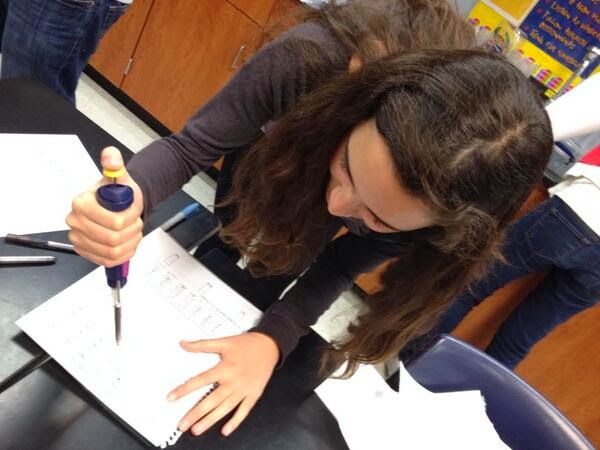 |
| My student learning to use a micropipette |
I push the envelope for myself because I want to know if there is anything I can improve to help my students learn the concepts and skills I teach. If I learn ANYTHING that can have a positive impact on JUST ONE STUDENT, then I have now made a difference to that kid- for life! Still that does not explain why I am not satisfied to just stay in the seat as a learner, so that I can absorb more and pass it on to my students.
 |
| My student using the iPad to demonstrate learning. |
Most of the tech presenters I admire are years younger than I. Most of the ones that are close to my age have been in educational technology far longer than I. I am at an age where others might think that I "should" be winding down; not ramping up my learning. In a way, that is WHY I do this! I want others of my age to know that if I can do this, so can they. I also want those who are younger than I to get ideas for content and classroom management. I believe it when Jon says that WE ARE THE ROCKSTARS! I drank that Rock Star Kool Aid a couple of years ago. I do it because I believe there is a need for educators to see others in the practice doing what they do best!
We are all tasked with being leaders! I want to learn from anyone willing to teach me what they know. If you have not considered being a presenter to other teachers, you should. Whether you show others what you know informally or at a "professional" workshop, do it! I am certain that you have something vital to share- even it if isn't tech related.
Some of the most engaging presenters I have learned from in the last few years include:
Jon Corippo (CUE- Apple)
Rushton Hurley (CUE)
Will Kimbley (CUE)
Nicole Dalesio (CUE- Apple)
Jen Roberts (CUE)
Catlin Tucker (CUE)
Ramsey Musallum (CUE)
Lodge McCammon (Discovery Education)
Hall Davidson (Discovery Education)
Lindsey Hopkins (Discovery Education)
Let me know what you think? I would love to hear your ideas on how to improve my presentation skills. I would also love to hear why you present to other people in your profession. And if you are not a presenter, what is holding you back?
Thursday, January 2, 2014
Reflex vs Reflect: Which Promotes Change?
 |
| Question: What did you like best about our learning environment? |
This part of the year is always a time for me to review what I have done during the past 12 months. Typically, I get maudlin' over what I have forgotten to do and then I plunge ever forward in an automatic manner whether I am considering my personal life or my classroom. In other words, in the past, things generally did not alter all that much from year to year. Reflex reactions do not necessarily promote positive or productive change.
Here are three things I did differently this year:
1) I have been reducing the amount of copy paper I use in my classroom. One example of this is that I used to have students use a bi-weekly calendar that I copied and gave out. We went to using the Student Handbook that has an assignment calendar inside. Many students used to throw the Handbook away. Now my students also have access to schedules, school information, contact data and their assignments in my class and others as well. By the end of the year, this act alone will save approximately 8 or 9 reams of paper. I have been trying to reduce the volume of paper I copy and hand out all year. Before I print a copy of anything, I ask myself "Could this be done digitally? Could students use their spiral notebook to record their answers?" Things like lab conclusions are now done entirely online, using turnitin.com. Quizzes are done on smaller documents, so that I can print a couple or three answer sheets on a single piece of paper.
 |
| One of the Apps I use to reduce paper in my classroom |
Here is why I am working toward paperlessness: A) The cost of paper and printing is ever increasing B) Physical papers get lost- but if you save/file the work correctly in the cloud- digital work stays where you put it and C) Reducing paper is better for the environment in many ways- reduce the energy/resources to make the paper and print on it as well as reducing the landfill pressure.
I will continue pushing to reduce my paperwork ever further. Until I have a class set of Chromebooks or iPads, there will still have to be a certain quantity of paper associated with some of the work my students do.
2) I have been working toward "Flipping" the instruction in my classes over the last couple of years. I eliminated some lessons and paper based work in favor of a more exciting, dynamic learning environment. I have not completely gotten rid of all powerpoint lectures, and worksheets but most of them are now available in some form of digital format or a screencast video to be watched outside of school hours. This school year I have taken it further by having students doing more lab activities and more content discussion than I had in the past. I have added some projects designed to be used for review prior to tests. We are doing fewer paper/pencil vocabulary quizzes in favor of team flash cards, individual white board activities and "Bring Your Own Device" electronic tools to record learning and to help students prepare for tests.
 |
| New Flipped Lesson- Lab Instructions using the Tellagami App to explain how the activity is set up |
Here is why I have moved toward a more interactive (flipped) learning environment: A) Students can adjust the pace of the screencast lecture based on their individual learning style. B)
Students who are absent during a vital learning experiences often have trouble catching up. If lectures are recorded the information is available to absentees and while class discussions and labs support the learning of those present, the base information is available in a format designed to be reviewed by anyone. C) Discussion and Lab activities are powerful motivators for learning - students perceive this kind of learning as "more fun". Students often need a hands on experience to help them bridge the content gap from knowledge level to deeper levels of Bloom's such as application and synthesis.
I will continue to expand the variety of learning opportunities for students of every learning level. I hope to reduce and eventually eliminate unit summative multiple choice style testing, but I find that big summative projects and essay style tests are very time consuming for me to provide timely feedback. I need to find a happy medium in which I engage students in more projects, but that can be easily reviewed to determine the level of mastery my students have achieved.
 |
| My Blog helps me focus on what I am currently doing and my plans for future instruction |
Here is why I have been blogging. A) When I am considering "how things are going," I find that I have to slow down and think about what is going on around me. B) I have become more of an author of my educational destiny rather than a reactant in a series of events happening around me. I can direct my learning and focus on my response to events happening in my world. C) My blog has caused me to be braver and more self confident in my activities. A couple of my posts have helped me to make important career decisions.
I will continue to blog and maybe try to increase the number of posts I make. My posts are long, so perhaps I should attempt break them into smaller chunks. I have several future blog posts rumbling around in my head and even a couple started on the boiler plate for future writing. So far, the blogs have really been for myself, but when I finish a post, I have published it to my PLN, so they can know me a bit better and maybe glean some ideas out of my musings. I will continue to reach out to other educators to adjust my learning for myself and for my students. I would like to help my students to develop a learning network of their own.
I want the remainder of this school year to be one in which I reflect and revise, rather than do things reflexively- they way they always have been done. I have several areas I want to adjust and I need some time to consider what I can do to make those parts of my learning, teaching and personal life more productive.
Saturday, December 28, 2013
Who wants an "APPY HOUR?"
Just before the Winter Break, our district issued iPad airs to any teacher who came to a short training session; where they basically told us to "play" with our new tool. They showed people how to sign up for an apple ID and how to download Apps. Since I have been using my own iPad most of last year and all of this year as a classroom tool, I have more experience with it than most at my school site.
A couple of days later, I met up with a few teachers from my school who wanted to learn or share what they know about the iPads. We called it "Appy Hour". A few days ago, I met up at Starbucks with a another bunch of colleagues. If you couldn't come, here are some resources I showed people there.
All of these apps were free when I uploaded them to my first iPad- some may have started charging for the current version of the app- hopefully you got some iTunes money from Santa! I remember a conversation I had with one of the administrators in my district about the fact that we had these $500-700 devices and couldn't part with $3 for a useful App. It turned my cheapskate mentality around just a bit.
The list of powerful apps that now comes with your new iPad includes the Apple tools such as Pages, Keynote, iMovie, iPhoto, GarageBand, and Numbers. For me, those productivity apps are all good solid programs that I use on my Mac Book Pro. I paid for the iPad versions for my personal device over a year ago.
I have used all of these Apps below in one way or another in my teaching. I recommend that you explore each of these a little to see if you can use them, too.
Doceri - (Free App on your iPad) - I use this tool at least 2 times per week or more. It controls your computer from a remote location (within wireless distance). It allows you to write on your screen (like an IWB). You can record your presentation and share it.

You can download a free trial version for your desktop or laptop.
NOTE: It took me about 3 months of use before I decided it was worth the money and then it took me another 4 months to actually get off my wallet and pay for it. It is WORTH EVERY PENNY I paid.
I hear there are some other cool features with respect to controlling other devices (speakers etc), but I don't have the hardware for it in my classroom (YET).

Educreations - Create video screencast lessons. You can select a background, upload images and PDFs as well as write text and draw using a stylus or your finger. You can create each slide and then voice record over your slides. Then you share your screencast. There are also featured lessons sorted by subject area you can link to your lessons. The screencasts are public and published online in Educreations. You can also create a course for your students with your presentations. Educreations
 ShowMe -Create video screencast lessons similar to Educreations but you have more color options ($.99 each at the App store)for your text and drawings. There is an active online learning community here as well.
Lessons from the ShowMe Community
 Quizlet- A vocabulary study tool. It is both an App and an online website. I use the online tools to create lists of vocabulary words. I use it to create vocabulary quizzes. The students can use this tool on their smart phones like flash cards and they can play games to help them memorize the content. I have had several students create their own account and use it to help them with vocabulary for other classes.

Tellagami-An animation tool that I use to introduce a topic, make announcements or give instructions for an activity. I have students use this App for sharing content in their video projects. You can customize the backgrounds, the characters and even voice record the dialogue. It can be shared as a link online and also save it to your camera roll, so that you can go back and add it to another video using iMovie or some other video application.
Tellagami
 TooNoisy - A dial to help you manage the volume level in your classroom - Not the best way to use an iPad or iPhone - but it can be good if your classes are doing group work and you are conferencing with students to help students keep the noise level appropriate for the tasks you are doing.
Apps Gone Free - a daily list of Apps that are free. I have found several free apps from connecting with other teachers and from people posting on my Twitter feed when a developer is doing a "free app day". This app gives you access to those apps on a daily basis.
I love the idea of a"free" app but in a way it comes with a cost. Sometimes the apps have annoying commercials/ads on them. And then my iPad screen was being overrun with too many apps that I never found the time to learn and use. So now I am very PICKY about the free apps I put on my iPad. If it looks like an app I can use, I upload it then if I don't use it within a couple of weeks, I delete it.
I have the following apps on my iPad and have only looked at them without using them with my students. These are in the category of I know this will be useful at some time in the future- I just need the time to learn how to incorporate it into my teaching, planning, and learning.
Wunderlist- a productivity tool that allows you to generate lists in categories. I generally have used the iPad Note App for my lists- but this looks promising.
iBrainstorm- Sticky notes can be shared between devices.
PicCollage- an App that allows you to add several of your photos together into a single page.
Explain Everything-Seems similar to Educreations-though it may be more sophisticated
Cloudart - Upload text to create a word cloud
Dragon Dictation - a voice recognition application that records your voice and translates it into text
Touchcast but I have never created a video cast with it- LOOKS very interesting! Very high on my to do list
Aurasma is also very cool and on my to-do list. I have played around with it and watched a few auras- but never made one for my self.
Here is a good general resource for some educational apps for both teachers and students. I have several of these apps on my iPad already. Some I use more than others. There are also some good links at the bottom for the post for specialty or content related apps.
iPad Apps 4 School
There is a group of local teachers who have a website called Apps In Class (they call themselves iPad Jedi Masters for Padawan learners). They have a very thorough website in which you can learn some basic iPad things (iPad 101), get some sample lessons or go deeper into apps by Bloom's Taxonomy. You can also follow them on twitter @appsintheclass.
Apps In Class
A couple of days later, I met up with a few teachers from my school who wanted to learn or share what they know about the iPads. We called it "Appy Hour". A few days ago, I met up at Starbucks with a another bunch of colleagues. If you couldn't come, here are some resources I showed people there.
All of these apps were free when I uploaded them to my first iPad- some may have started charging for the current version of the app- hopefully you got some iTunes money from Santa! I remember a conversation I had with one of the administrators in my district about the fact that we had these $500-700 devices and couldn't part with $3 for a useful App. It turned my cheapskate mentality around just a bit.
The list of powerful apps that now comes with your new iPad includes the Apple tools such as Pages, Keynote, iMovie, iPhoto, GarageBand, and Numbers. For me, those productivity apps are all good solid programs that I use on my Mac Book Pro. I paid for the iPad versions for my personal device over a year ago.
I have used all of these Apps below in one way or another in my teaching. I recommend that you explore each of these a little to see if you can use them, too.
Doceri - (Free App on your iPad) - I use this tool at least 2 times per week or more. It controls your computer from a remote location (within wireless distance). It allows you to write on your screen (like an IWB). You can record your presentation and share it.
You can download a free trial version for your desktop or laptop.
NOTE: It took me about 3 months of use before I decided it was worth the money and then it took me another 4 months to actually get off my wallet and pay for it. It is WORTH EVERY PENNY I paid.
I hear there are some other cool features with respect to controlling other devices (speakers etc), but I don't have the hardware for it in my classroom (YET).
Educreations - Create video screencast lessons. You can select a background, upload images and PDFs as well as write text and draw using a stylus or your finger. You can create each slide and then voice record over your slides. Then you share your screencast. There are also featured lessons sorted by subject area you can link to your lessons. The screencasts are public and published online in Educreations. You can also create a course for your students with your presentations. Educreations
ShowMe -Create video screencast lessons similar to Educreations but you have more color options ($.99 each at the App store)for your text and drawings. There is an active online learning community here as well. Lessons from the ShowMe Community
Quizlet- A vocabulary study tool. It is both an App and an online website. I use the online tools to create lists of vocabulary words. I use it to create vocabulary quizzes. The students can use this tool on their smart phones like flash cards and they can play games to help them memorize the content. I have had several students create their own account and use it to help them with vocabulary for other classes. Tellagami-An animation tool that I use to introduce a topic, make announcements or give instructions for an activity. I have students use this App for sharing content in their video projects. You can customize the backgrounds, the characters and even voice record the dialogue. It can be shared as a link online and also save it to your camera roll, so that you can go back and add it to another video using iMovie or some other video application.
Tellagami
TooNoisy - A dial to help you manage the volume level in your classroom - Not the best way to use an iPad or iPhone - but it can be good if your classes are doing group work and you are conferencing with students to help students keep the noise level appropriate for the tasks you are doing.Apps Gone Free - a daily list of Apps that are free. I have found several free apps from connecting with other teachers and from people posting on my Twitter feed when a developer is doing a "free app day". This app gives you access to those apps on a daily basis.
I love the idea of a"free" app but in a way it comes with a cost. Sometimes the apps have annoying commercials/ads on them. And then my iPad screen was being overrun with too many apps that I never found the time to learn and use. So now I am very PICKY about the free apps I put on my iPad. If it looks like an app I can use, I upload it then if I don't use it within a couple of weeks, I delete it.
I have the following apps on my iPad and have only looked at them without using them with my students. These are in the category of I know this will be useful at some time in the future- I just need the time to learn how to incorporate it into my teaching, planning, and learning.
Wunderlist- a productivity tool that allows you to generate lists in categories. I generally have used the iPad Note App for my lists- but this looks promising.
iBrainstorm- Sticky notes can be shared between devices.
PicCollage- an App that allows you to add several of your photos together into a single page.
Explain Everything-Seems similar to Educreations-though it may be more sophisticated
Cloudart - Upload text to create a word cloud
Dragon Dictation - a voice recognition application that records your voice and translates it into text
Touchcast but I have never created a video cast with it- LOOKS very interesting! Very high on my to do list
Aurasma is also very cool and on my to-do list. I have played around with it and watched a few auras- but never made one for my self.
Here is a good general resource for some educational apps for both teachers and students. I have several of these apps on my iPad already. Some I use more than others. There are also some good links at the bottom for the post for specialty or content related apps.
iPad Apps 4 School
There is a group of local teachers who have a website called Apps In Class (they call themselves iPad Jedi Masters for Padawan learners). They have a very thorough website in which you can learn some basic iPad things (iPad 101), get some sample lessons or go deeper into apps by Bloom's Taxonomy. You can also follow them on twitter @appsintheclass.
Apps In Class
Sunday, December 15, 2013
Group Projects SUCK! AND they ROCK!
 This week my students have been getting ready to review for their end of semester final exams. Instead of assigning reading and worksheets, I posted a study guide online and told them completing it would equate to some extra credit. I decided that we needed to do a group review project instead.
I gave out general directions for creating videos on Friday- they picked their groups, they decided which type of project they would do and they began planning. Over the weekend, I sent an email with information and a work schedule / due dates to all students and to any parents who are signed up for our School Loop account. The following Monday, I handed out a 1 to 5 point scale rubric (with scoring guide) to help them focus on their work. There was a strict timeline, because we are at the end of the semester. This project was the only thing we were doing in class until Thursday's due date and then Friday we would watch the videos or listen to the music.
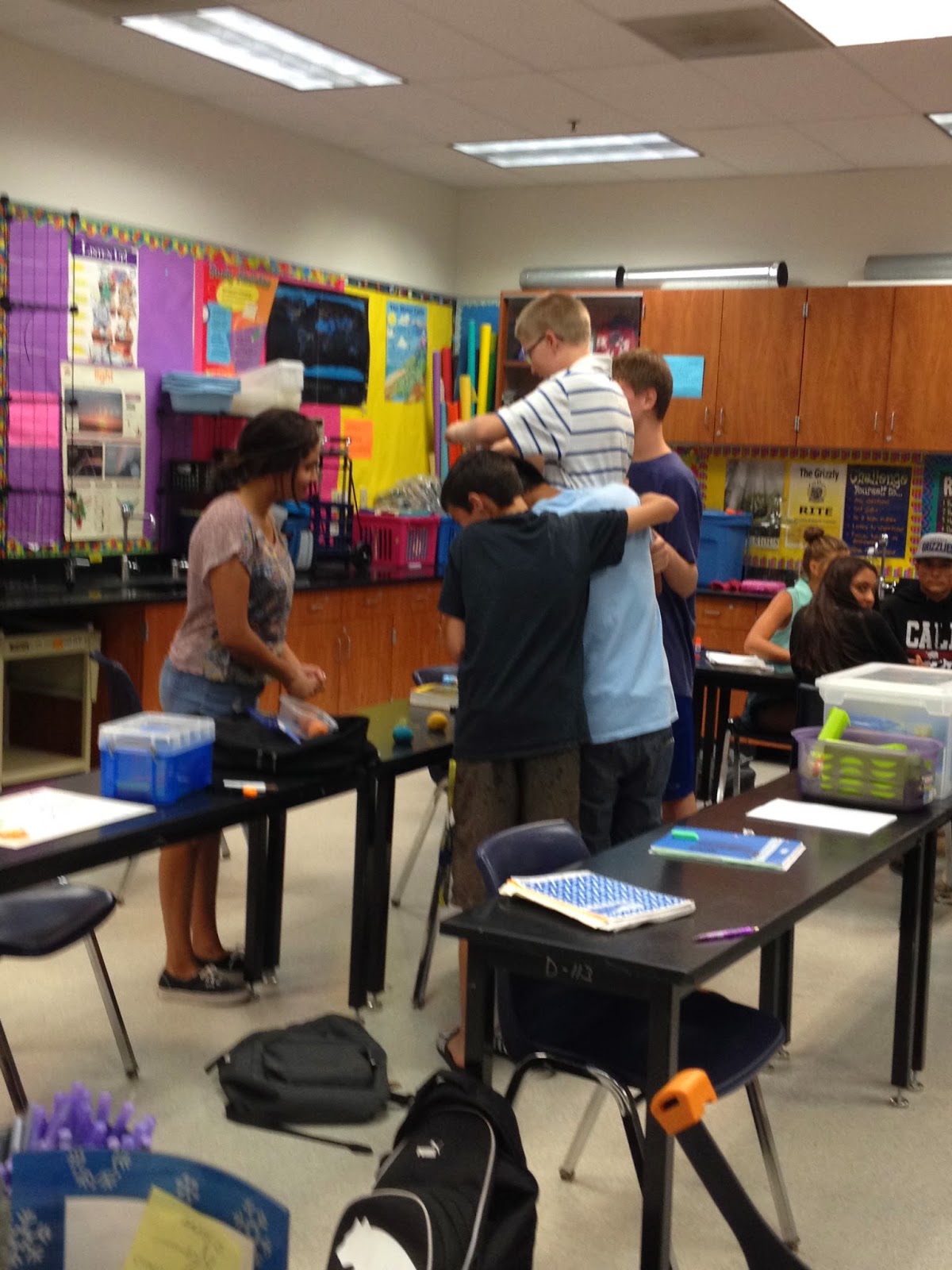 |
| Students using video cameras in my classroom to create a review clip |
The other thing that sets the stage for this project is some experiences we have already had as a class to create video projects. This year our school has had 2 Saturday School events. It is strictly voluntary on the part of students and teachers. The district needs to get back some of their average daily attendance, so they offer some half day (4 hour block) classes for students to "catch up"or "get ahead. I generally use these days for both. The students spend the first part of the day working on overdue work and then they work on assignments that enrich their learning. I usually have about 20% of my students register and attend on this day. Sometimes the learning activities are lab experiments or crafting projects that I wouldn't normally have time for in a 55 minute period. This year, I had the students build video projects to help us review for upcoming tests. I searched for youtube videos on how to make different kinds of videos and showed them to the students before we started work.
So some of my kids had already had experience with creating video projects with the equipment we have in my class. I depended on those students with experiences in the Saturday setting to help take the lead in this project.
I am sharing about the experience because WE ALL learned so many things from this doing this project. There were some things that went well and some things that were the source of frustration for both me and for my students. Recognizing the good and the evil will help us complete tasks of a similar nature in the future.
CONFESSION TIME: I made some major organizational mistakes in the original implementation of the assignment. Below is a list of things to consider...
- Team Size- Groups should be 2 or 3 people ONLY. I originally felt like more people would help save time in the development and preparation stages, but groups of 4 or 5 were less productive because no one could decide what to DO and so less got DONE.
- Project Type-Assign only 1 or 2 video modes that can be used by the students to complete their projects. I had 5 or 6 different choices (stop motion/photo montage, music video, claymation, paperslide, Draw My Life, live action) and that meant that students had a hard time helping others in different groups because they were focused on their own TYPE of technology for the project. I usually capitalize on student experts during most learning activities in my class and this time they couldn't help each other as much to finalize their projects because so many different types of videos were being produced.
- "How To..."Videos- Take the time to show those Youtube tutorials during class, so that mistakes like using a regular pencil and lined paper on a paper slide are prevented. I thought that the inexperienced students would go look up those videos on their own- I even suggested it. But many of them went forward with my general description rather than do the research themselves. The details of "how to..." create the project got consumed in making sure the content was accurate.
- Streamline the Collection-I told students to send me the link to their finished/published videos using my School Loop email. That was a BIG MISTAKE! Now my inbox is littered with questions, 55 or 60 hyperlinks, and regular school business emails all mixed together. Talk about confusion for the last 2 days of the project! In addition, some students sent links to my gmail account and to my regular district outlook email address. It took me 3 hours just to figure out where all these assignments ended up. Some students even sent me their project in various pieces hooking up their camera to my laptop- for me to splice together. What a mess! I ended up creating a google form to help me curate and keep track of all the videos and where they are at. That made them easier to grade and prepare for showing to the classes. I have still not seen them all, because I have not accessed every link from every email that was sent. Next time the students will send their work directly to to a google form, then I can just click on the links.
- Student Samples-The students are really excited to see their work! However, DO not show student created videos to the class until YOU are ready. I had several student projects with audio or video problems. Even though content was course appropriate, it was difficult to watch, from the technical standpoint. Remember, we are all novices at this thing- so some reduction in video or audio quality is to be expected. Thank goodness the videos were limited to 3 and a half to 4 minutes. But that can feel like a life time of frustration or embarrassment to the group whose video is having problems and a lifetime of boredom for the observers. By third period, I figured out that I couldn't show every single project during class mainly due to technical difficulties. I had to explain to students who want to see everyone's work that there were technical difficulties that made projects difficult to see or hear.
- Group Progress- My students got to choose their team mates. I advised them to pick people they could trust- but also that they might want to go outside of their normal social circles to create a more diverse work atmosphere. Some students followed my advice, but they neglected to get contact information from their team mates. That also meant that they might not have similar schedules to complete work outside of class time. I didn't allow for single outliers and unfortunately not everyone wanted to work with a team. Some people were absent, also making it difficult for teams to complete some portions of the project. Next time, I may give them a card or a form to help them exchange information more efficiently and be more productive outside of class time.
So you might be wondering if I did ANYTHING correctly on this project. Here are the things I am most proud of...
- Communication- I notified the students and parents about the project using a group email, which prevented some problems. I heard back from a number of parents about planned absences, appointments and questions when teams were scheduled to be working together. It helped everyone be aware of the expectations which created an open line of communication so that when there were problems, people already felt they could come get my assistance. When a few parents shared their concerns, they felt like I listened and were happy with my suggestions.
- Excitement- Students were really excited to push the envelope with the technology. I did not give a lot of instruction on how to use the technology in the classroom. Since it was a BYOD activity with some in class support, I told them if they couldn't figure it out, I would help them. I made suggestions for aps to use and they gave me some ideas back. Many students took this project and ran with it to create some really decent video products. They learned independently to operate their equipment or they used mine and learned from that as well.
- Evaluation- I created a google form for each day to help students evaluate their day's work and plan for the days ahead. I was able to discuss with groups when there were issues with partners or if they were having a problem with tech or content information.
- Purpose- Students already had enough content information to help them create decent review products for themselves and for others. It means they learned the information or knew where to find it to help them create more informative videos, but also allow for some creative license in the creation of the video. I broke the content into smaller chunks so that students could focus on one topic within a unit of study.
My students didn't have to just complete worksheets or do book work to prepare for their finals. They did not have to review old tests and make corrections during class time (they came after school if they wanted to do this). They got a chance to review an important part of the content in a fun and energetic format. And now after the project is over, they can watch each other's work for more review sessions. The other day, I posted a DiVA Awards (Diver Video Academy Awards), selecting the best 2 or 3 videos from each topic in the content.
Here are links to just a few of my favorites Remember these are student created and therefore somewhat amature-ish. They are pretty short- between 2 and 4 minutes each.
Mitosis
Please leave me a comment to help me figure out other things I could do the next time I decide to jump in and do a project like this.
Please leave me a comment to help me figure out other things I could do the next time I decide to jump in and do a project like this.
Saturday, November 30, 2013
A Passion for Teaching and Learning (and Coaching?)
 |
| The building in which I teach. |
I am passionate about my school. I love the school where I work. I feel so fortunate to work among colleagues who are innovative and as excited about teaching and learning as I am. It is a great environment that encourages forward thinking and fosters originality. Our administrative team supports our efforts by recognizing our creativity and allowing us to pursue ideas and initiatives that benefit students in areas of academic achievement and personal growth.
I am passionate about using technology as a tool for teaching. My district is going through a technology revolution. There is a huge cultural change happening among the leaders in our schools and at the main office. There are many teachers who have taken informal leadership roles in this paradigm shift. Last year's inception of the district committee for Technology For Instruction was a huge step on the march toward increasing the use of technology as a vehicle on the pathway to learning all kinds of content. I volunteered to be on this committee because I believe it is one that has an impact on how teachers prepare for the way students are now learning.
 |
| Using different applications to teach content. |
 |
| Seeing the "aha" moment during a lab activity. |
How can I have my cake and eat it, too? People I trust have advised me to apply for the tech coach job. I am pretty sure I have the skills I need to do a good job, though I also know I still have so much to learn. Here's the thing, I really love what I am doing in my classroom right now. The problem is that I am really afraid of jumping in and never being able to return to my students. There is also this real fear that this opportunity to meet my career goals will pass me by and leave me behind. So how do I do both things at the same time?
Can I be effective as a teacher and as a technology teacher leader? Perhaps I can propose a combination position to the powers that be. My schedule would be that of a part time teacher and a part time instructional coach. If I stay in the newly equipped classroom, I will be learning new skills for the lessons I present to my students. I can help show other teachers how the content could be enhanced by the technology. Since I would continue as a classroom teacher, I would be immersed in the day to day practical aspects of the implementation of the coming transitions.
This chance could be the occasion in my career to be a passionate teacher, an avid learner as well as a technology coach.
Many of you have recently had a similar experience. What model for professional development and tech training does your district use? Have you made the transition to being a technology teacher on special assignment in your district? What are the best things about the job? What are the challenges? What are your ideas?
Subscribe to:
Comments (Atom)